Multiple File Formats
Turn PDF, Word, PowerPoint, Excel, and ODT into flipbooks from one upload flow.


Features
Brand the viewer, add video and links on the page, then host, embed, or share. Built for magazines, reports, brochures, and catalogs from one dashboard.
All-in-one platform
Create, brand, enrich, and share professional flipbooks without juggling separate tools.
Turn PDF, Word, PowerPoint, Excel, and ODT into flipbooks from one upload flow.
Publish as many magazines, reports, brochures, and catalogs as you need. No per-book limits.
Drop a simple embed on your site, share a link, or post to social in a click.
Logo, colors, and viewer styling so every flipbook looks like your product.
Templates
Seven professionally designed styles. Pick one, then customize colors, backgrounds, and logos to match your brand.
Drag and drop the PDF to convert
or click to browse your files
Upload Select your PDFBrand & viewer controls
Styles, branding, security, and reader tools: set once, then reuse across publications.
Choose 3D, 2D, hard cover, binder, calendar, slider, or reader. Switch styles anytime.
Looks sharp on phones, tablets, and desktops with a layout that adapts to every screen.
Add your logo, colors, and brand link so every flipbook feels like your own product.
Place flipbooks on your website with a simple embed code. No extra plugins needed.
Share a direct link so anyone can open your flipbook in a browser, instantly.
Restrict access with a password so only invited readers can open private content.
Download your flipbook as HTML to host it yourself or use it offline when needed.
Monitor views, page engagement, reading time, leads, and PDF downloads for every flipbook.
Localize the viewer interface so controls and menus match your audience’s language.
Set a custom background color or image to frame your flipbook and match your brand.
Control how pages open and turn: left-to-right, right-to-left, and viewing layout.
Show or hide toolbar tools so readers get exactly the controls you want them to use.
Let readers find text across pages quickly with built-in full-text search.
Zoom in on details or zoom out for overview. Ideal for maps, reports, and fine print.
Add a contents menu so readers jump straight to chapters, sections, or product pages.
Allow readers to download the original PDF when you want offline sharing or printing.
After you publish
Host on your site, embed anywhere, use a branded address, share with advanced options, and track statistics and leads.
Download the flipbook HTML and host it on your own website or a client site, with full control of the files.
Paste a simple embed code into any page so readers open and flip through your publication without leaving your site.
On Professional, publish from a branded hub such as iflip.page/company_name/ so every flipbook shares one short, memorable address.
See views, page engagement, reading time, PDF downloads, and collected leads together so you know what performs and who to follow up with.

Your content library
One flipbook is great. A bookshelf lets readers browse your whole collection (magazines, reports, brochures, catalogs) from a single branded page or embed on your site.
Interactive pages
Add media, links, shops, forms, and more directly on the page. Each tool has a full feature guide.
Any device, one workflow
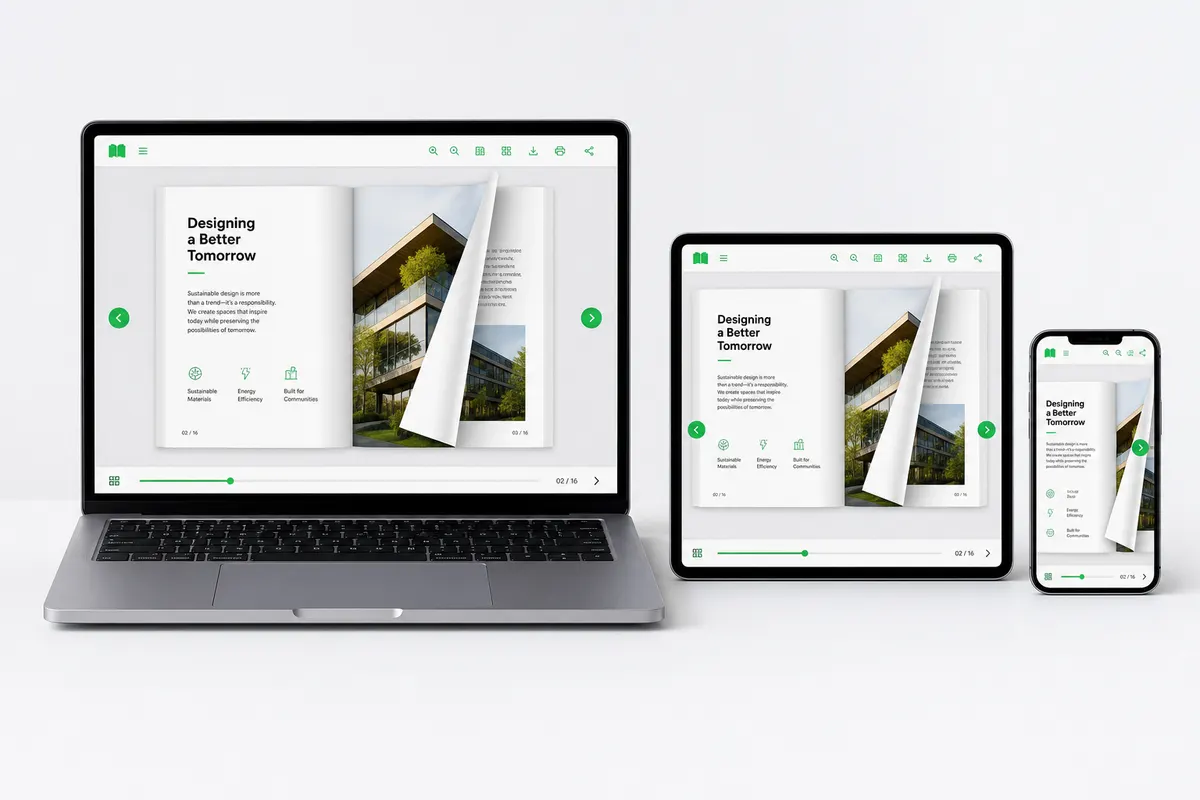
Publish once and reach every screen. Readers get a clear flipbook experience on phone, tablet, and desktop, while you manage everything from a single dashboard.
Stay on your website
Keep readers on your site. Drop a flipbook into any page, or embed a full bookshelf so visitors browse your whole collection without leaving.

Bring your documents
Upload PDF, Word, PowerPoint, or Excel and get an interactive flipbook you can share, embed, or open on any device.
Questions
After upload you can brand the viewer, pick one of seven flip styles, then add page video, photo tours, links and buttons, product tags, lead forms, info popups, animated GIFs, and page audio. You can also password-protect the book, embed it, share a link, or download HTML on Premium.
No. Teams use it for magazines, annual reports, brochures, newsletters, lookbooks, and training manuals. The same page tools work on any designed PDF, not only shop catalogs.
Yes. Paste a simple iframe on a page, sidebar, or full-width block. You can also embed a branded bookshelf so visitors browse several publications without leaving your site.
Yes. Set a password so only invited readers can open a private report, client proof, or members issue. Bookshelves can be protected the same way on Premium.
PDF works on every plan. Premium also converts Word, PowerPoint, Excel, and ODT into the same flipbook viewer, so office files and designed PDFs share one workflow.
Premium lets you download the flipbook as HTML and host the files on your website. You can also publish from a branded iflip.page address, or embed the hosted book on a page you already rank.
No. PDF Flip does not place ads on your publications. Paid plans also remove the Powered by PDF Flip mark so the reader sees your brand only.
Use the Load Your Own PDF box on this page, or start a free trial and upload from the dashboard. No credit card is required to try the converter and the page tools.